
"Yes, abroad too." Three words on a Bank Hapoalim help page, and they answer the question we're asked most before a flight. But the two lines beneath them matter just as much, because they explain why you sort this out before you leave the country.
The code that goes to a number you don't have
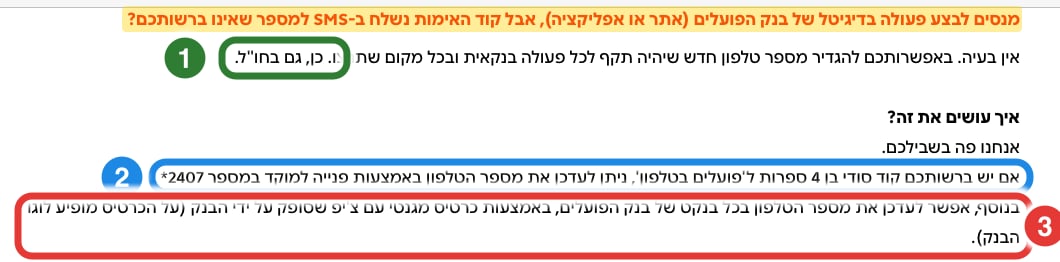
The question highlighted in yellow is the scenario: you try to do something on the website or app, and the verification code goes by SMS to a number you don't have. Abroad, that happens to anyone who swapped SIM cards or whose Israeli line is switched off.
Number 1, in green, is the good answer: you can set a new phone number for receiving codes, "yes, abroad too". In other words, a foreign number as well.
Number 2, in blue, is the first way to do it: the *2407 service line, with a four-digit secret code for Hapoalim's phone banking. Note that it's a star number, and Israeli star numbers usually can't be reached by a normal call from abroad. And if you don't already have that code, you won't get it on the spot.
Number 3, in red, is the second way: at one of the bank's self-service machines, with a magnetic card. Those exist only in Israel.
In practice, "yes, abroad too" is true of the number, not of where you set it up. You do it before the flight. And to me it's fine that it's cumbersome. Changing the number without strong identification is exactly what would help a thief.
The simpler route, if your phone supports two lines: keep the Israeli line active for SMS and browse on an eSIM. At Hapoalim, according to the bank's security pages, you can also ask for the code by voice message, in case the SMS doesn't arrive while roaming.
What the banks say about Wi-Fi
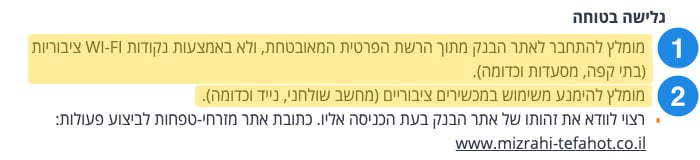
Number 1 in the screenshot: Mizrahi Tefahot recommends connecting to the bank from a secure private network, not from public Wi-Fi in cafés and restaurants. Number 2: avoid public devices. Not surprising, but abroad that's simply the normal situation. Hotel Wi-Fi is exactly a public network, and the lobby computer is exactly a public device.
What does work: banking over mobile data. And if Wi-Fi is the only option, through a VPN. More on that in a moment.
Bit: what we couldn't find
We searched Bit's site and the help pages of Bank Hapoalim, which runs it, for official guidance on using it outside Israel. We didn't find any. What is known: Bit identifies you by your phone number. According to media reports, changing your number in Bit deletes the existing account. So the only rule I'm willing to write with confidence is: don't change your number in Bit before or during a trip.
Bit's support is reachable from within the app, under your profile, "information and support". The *6428 number is, again, a star number.
A VPN with an Israeli server: helps here, not there
A VPN encrypts traffic between your phone and the server. On hotel Wi-Fi, that stops anyone on the same network from seeing or altering what passes through. An Israeli server also gives you an Israeli address, so the connection to your bank looks like what it's used to seeing from you.
But there are two limits, and I'd rather you heard them from us. A VPN won't lift a block your bank has already put in place, and you shouldn't try to get around a block by changing location. And banks, like other security services, can recognise VPN server addresses and ask for extra verification. There's no promise here, just a layer of protection.
If you want one, my pick is NordVPN: 14 servers in Israel according to its official page, and an app that connects by itself on unknown networks. You pay in dollars, about ₪269 ($80.73) for 27 months at the Bank of Israel representative rate of 26.11.2026, ₪3.334 to the dollar, plus your credit card's conversion fee, usually around 3%. ExpressVPN bills in shekels: ₪238 for 28 months. Either way, install and test it at home.
When you're already blocked
Then stop trying on your own. Call one of the bank's regular numbers, not a star number. At Leumi, for example, the technical support line is 03-9544333, which you can dial from abroad as +972-3-9544333. The same line handles a lost phone, to cancel biometric login. And at Leumi, after five failed fingerprint attempts, that login method is blocked until you sign in successfully another way. Worth knowing you have an ordinary password you remember.
And if a verification code arrives for an action you didn't take, don't give it to anyone. Not even someone presenting themselves as a bank representative. Leumi says so explicitly.
Sources
We captured the Bank Hapoalim and Mizrahi Tefahot pages on 23 November 2026.
- www.bankhapoalim.co.il/poalim-digital/otp
- www.bankhapoalim.co.il/he/data-security/safe-browsing
- www.mizrahi-tefahot.co.il/about-mizrahi-tefahot-he/secure-browsing
- www.leumi.co.il/he/Articles/34679
- leumi.co.il/Articles/15888
- www.mako.co.il/finances-consumer/Article-b28e30d2288e361006.htm
- ssd.eff.org/module/choosing-vpn-thats-right-you
- nordvpn.com/he/servers/israel
- www.boi.org.il/roles/markets/exchangerates