The black strip across the top of NordVPN's page isn't there to scare anyone. It simply shows every visitor what any website knows about them before they've clicked on anything.
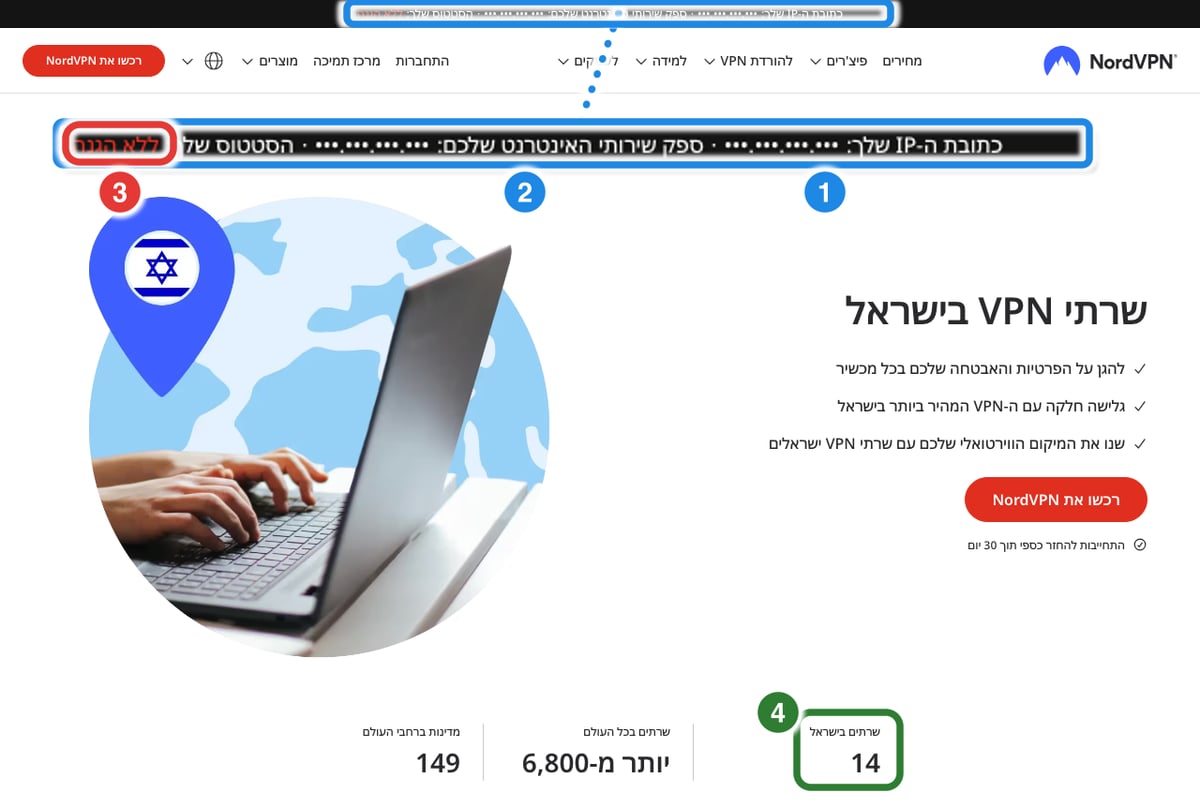
We opened the page from an ordinary home connection, no VPN. The tiny strip is enlarged in the blue frame. Number 1 is the IP address; we replaced the digits with dots. Number 2 is the name of the internet provider, which we masked as well. Number 3, in red, is the status: "unprotected". Number 4, in green, we'll come back to at the end.
What a site sees in the first second
An IP address isn't a name or a street address. Only your internet provider can link it to your subscription. But it's enough for a website to know which country you're in, roughly which region, and who your provider is. That's exactly what the strip showed us.
In practice it's used three ways. Sites show you content by country. Advertisers recognise the same connection between visits. And some services block regions they don't serve.
Now what the address doesn't do: it doesn't tie you to an account. If you're logged into Google or Facebook, they know who you are, VPN or not. An app with location permission knows where you are from GPS. Changing your IP touches neither.
Router, mobile data, proxy: a swap, not a disguise
The three most common "hide your IP" tricks on forums really just swap it.
Switching the router off for a few minutes sometimes gets you a new address, if yours is dynamic. It belongs to the same provider, in the same area. Moving from Wi-Fi to mobile data swaps it for the mobile carrier's address, and the carrier knows exactly who you are too. Both are handy after a temporary block on a site. For privacy they add nothing.
A proxy does hide your address from the site. Most free ones only work in the browser, don't always encrypt, and whoever runs the proxy sees what passes through it. When the service is free and it's unclear who operates it, I wouldn't send anything through it that needs a password.
VPN: now the one watching is the provider you picked
A VPN sends all of the device's traffic, from every app, through an encrypted tunnel to the provider's server. The site sees the server's address. Your internet provider only sees that you're connected to a VPN server. That's the real difference from a proxy: full coverage, with encryption by default.
The price is trust. What your internet provider used to see is now in the VPN provider's hands. So my first question isn't speed, it's whether the no-logs policy has been checked by an outside auditor. All four providers we compare have such an audit. NordVPN went through its sixth with Deloitte at the end of 2025.
Tor: the strongest, and the least convenient
Tor routes your connection through three volunteer-run servers, so none of them sees both you and your destination. For anonymity it's the strongest tool of the lot, and it's free.
The limits are spelled out by the Tor Project itself. It's slow for video and big downloads. Many sites throw up a CAPTCHA, because thousands of users exit from the same address. And there's no simple way to pick an exit in Israel. If you need an Israeli website from abroad, Tor is simply the wrong tool.
An Israeli IP from abroad, and what it costs in shekels
Back to number 4 in the screenshot: 14 servers in Israel, according to NordVPN's page, where you can pick Tel Aviv on a map. According to their official sites, Proton VPN lists 40 servers in Israel, Surfshark eight in Tel Aviv, and ExpressVPN has an Israeli location that isn't marked as virtual. Checking after you connect is easy: open our IP check and make sure the country says Israel.
On price, every dollar amount here is converted at the Bank of Israel representative rate of 26 November 2026, ₪3.334 to the dollar. At Black Friday prices checked on 26 November 2026, NordVPN Basic costs about ₪269 ($80.73) for 27 months, and renews at about ₪464 a year ($139.08). Surfshark Starter is about ₪179 ($53.73) for the same period. ExpressVPN is the only one that bills Israeli visitors in shekels: ₪238 for 28 months.
That shekel-versus-dollar difference isn't a technicality. On dollar payments, most Israeli credit cards add a foreign-currency transaction fee, 2.9% in Isracard Direct's price list. I did the full multi-year sum in our article on renewal prices.
If the goal is a stable Israeli address, I'd go with NordVPN. It has the most Israeli servers of the three big names, six no-logs audits, and its renewal price sits right next to the price rather than on a separate page. It isn't the cheapest. If paying in shekels matters most to you, look at ExpressVPN; if you need something free for one device, check Proton's free plan.
One more note, because it comes up in every question we get: streaming services and banks have their own terms about VPNs. An Israeli address doesn't override those terms, and it won't help if the account itself has been blocked.
Sources
We captured NordVPN's servers page on 23 November 2026. Server counts for the other providers come from their official server lists. Tor's limits are from the Tor Project support pages, and the exchange rate from the Bank of Israel.
- nordvpn.com/he/servers/israel
- nordvpn.com/pricing
- nordvpn.com/blog/nordvpn-no-logs-assurance-engagement-2025
- protonvpn.com/vpn-servers
- surfshark.com/servers/israel
- www.expressvpn.com/vpn-server
- support.torproject.org/tor-browser/encountering-issues/captchas
- www.boi.org.il/roles/markets/exchangerates
- digital.isracard.co.il/globalassets/isracard/pdf/forms/taarifon_doar.pdf