

You walk into a hotel lobby in Barcelona after a red-eye. Your phone shows two open networks: Hotel-Guest and Hotel-Guest-Free. Which one do you join? If your answer was "whichever has more bars", this article is for you.
First, the story has changed. Ten years ago an open Wi-Fi network really was the Wild West. Today most websites and apps encrypt their traffic with HTTPS, and the US Federal Trade Commission (FTC) now says connecting to a public network is "generally" safe because of it. Note the wording. "Generally" isn't "always", and the gap lives in three places: the fake network, the fake website, and the phone that hasn't been updated since the summer.
The network with the right name isn't necessarily the right network
HTTPS protects the road between your phone and the website. It doesn't tell you who's standing at the other end. The FTC itself adds the caveat: a scam site can use encryption just like a real one, and your password will reach it beautifully encrypted.
Hotel networks add another layer. Anyone who sets up an access point with a name that sounds official gets everyone who connects, no questions asked. In July 2025, according to a report on ice, Israel's National Cyber Directorate warned travellers against public Wi-Fi and public charging stations, given the hostility toward Israelis abroad. In the same report, Gil Messing of Check Point suggests a check I like for its simplicity: read what the network's login page asks for. A hotel login page that wants access to your contacts or your camera? That isn't a login page. It's something else.
The US Federal Communications Commission (FCC) adds its own trick: try connecting with a wrong password. If the network lets you in anyway, it isn't really secured. And back in that Barcelona lobby, the fix isn't guessing. Ask the front desk for the exact network name, and if there's nobody to ask, stay on mobile data.
What the NSA recommends, and why it matters to you too
The US National Security Agency published guidance for its own staff and for defence contractors. Not exactly a tourist audience. Still, the advice is exactly what I'd tell a friend flying out tomorrow.
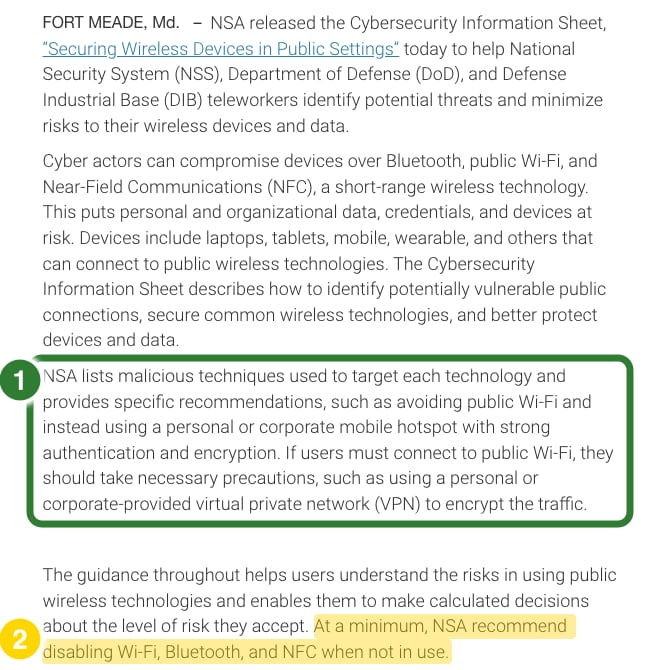
Number 1, in the green frame, is the order of priorities: avoid public Wi-Fi in the first place and use a personal hotspot with a strong password. Only if there's no other option, connect through a VPN that encrypts your traffic. Number 2, highlighted in yellow, is the minimum the NSA asks of everyone: switch off Wi-Fi, Bluetooth and NFC when you're not using them. It sounds trivial. In practice it's the only step on the list that costs nothing and needs no app.
It's also worth noticing what the NSA doesn't say. It doesn't say a VPN protects you from everything. A VPN encrypts all traffic between your device and the provider's server, so whoever runs the network, or whoever set up a fake one, sees an encrypted connection to a single server, not the sites you open. But if you type your password into a phishing site, the VPN will deliver it safely to the crooks. If your device is already infected, the VPN won't clean it. And if the person behind you in the security queue is reading your screen, no encryption will help.
The hotspot wins. Almost always
If you have an eSIM or a roaming package with enough data, a hotspot from your phone is the safer choice for your laptop. You set the password and you know who's connected. That's also the NSA's first recommendation, as we just saw.
Hotel Wi-Fi makes sense when you need lots of data: backing up 3,000 holiday photos, or an hour-long video call home. In that case, here's the order I'd follow: confirm the network name at reception, accept the hotel's login page, switch on the VPN right after, and keep your banking app for mobile data. The FCC explicitly advises against logging into your bank over public Wi-Fi.
At the airport it's simpler. You're there briefly, and most of what you do is check your flight and message that you've landed. If your data plan is already active, there's no reason to join the terminal network.
One more small habit most people forget: delete the network from your phone at the end of your stay. Otherwise it'll try to auto-join any network with the same name, anywhere in the world.
Which VPN to take on your trip
Install the VPN and sign in at home, not over the hotel network. Most of the well-known apps can also connect automatically when the phone detects an unfamiliar network, and that's exactly the setting worth switching on, because nobody remembers to turn anything on during the first day of a holiday.
My pick here is NordVPN, for two reasons you can check. First, the app can auto-connect on unsecured Wi-Fi, and its kill switch blocks traffic if the connection drops. Second, its no-logs policy has been audited by Deloitte six times, and according to its official site it has 14 servers in Israel, which matters if you want to reach Israeli sites from abroad. At Black Friday prices checked on 26 November 2026, it costs about ₪269 ($80.73) for 27 months, roughly ₪9.97 a month ($2.99), at the Bank of Israel representative rate of November 26, 2026: ₪3.334 to the dollar. The renewal price is higher, about ₪464 a year ($139.08); we broke it down in our article on renewal prices.
NordVPN bills in dollars, and most Israeli credit cards add a foreign-currency transaction fee on top: 2.9% in Isracard Direct's tariff, 3% at First International Bank. If you'd rather see a fixed shekel amount on your card statement, look at ExpressVPN, which shows and bills Israeli visitors in shekels: ₪238 for 28 months, renewing at ₪299.95 a year. Travelling as a family with five phones and two tablets? Surfshark doesn't cap the number of devices, and its Starter plan costs about ₪179 ($53.73) for 27 months. All three offer a 30-day money-back guarantee, so you can install before the flight and make sure everything works.
And if you ask me what matters most in all of this, it isn't the VPN. It's asking the front desk for the network name.
Sources
What the FTC says about encryption and public networks: consumer.ftc.gov/articles/are-public-wi-fi-networks-safe-what-you-need-know
The NSA guidance: www.nsa.gov/Press-Room/News-Highlights/Article/Article/2711968/nsa-issues-guidance-on-securing-wireless-devices-in-public-settings
The FCC's tips for travellers: www.fcc.gov/sites/default/files/cybersecurity_tips_for_international_travelers.pdf
The ice report on the National Cyber Directorate warning (July 2025, Hebrew): www.ice.co.il/tourism/news/article/1076923
Prices and features from the official sites: nordvpn.com/pricing nordvpn.com/servers/israel www.expressvpn.com/order surfshark.com/pricing Exchange rate: www.boi.org.il/roles/markets/exchangerates Foreign-currency fees: digital.isracard.co.il/globalassets/isracard/pdf/forms/taarifon_doar.pdf