
"Incognito mode can help keep your browsing private on your device, but it doesn't make you invisible." That isn't a line from a site selling VPNs. It's from Google's own Chrome help page, in its Hebrew version. Notice the words "on your device". Everything else follows from them.
Three frames on one Google page
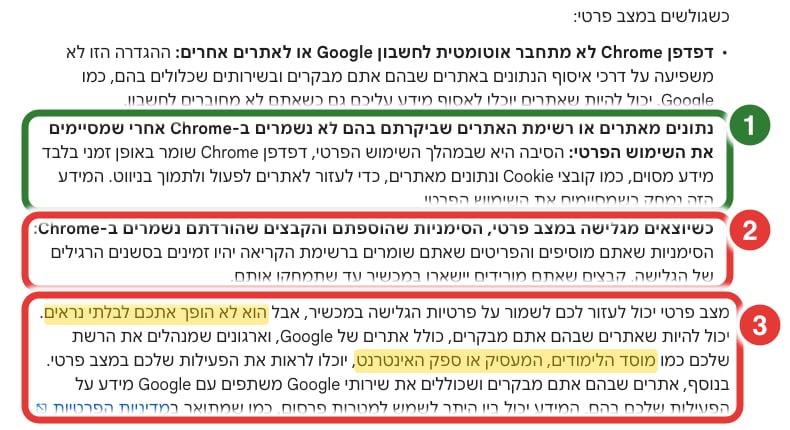
The green frame, number 1, is what incognito mode really does: the sites you visited, cookies and site data aren't kept in Chrome once you close every private window. It's a real promise, and it works.
Number 2, in red, is what people discover too late. Bookmarks you added and files you downloaded stay. Download a PDF in a private window and you'll find it in your Downloads folder tomorrow morning.
Number 3, also in red, is the paragraph that made me write this. I highlighted the two key parts in yellow: it "doesn't make you invisible", and your activity may be visible to "your school, employer or internet provider". Google adds that sites using Google services share information about your activity with Google, in a private window too, for advertising as well.
Mozilla says the same about Firefox, in English and in fewer words: private browsing doesn't make you anonymous on the internet.
Who a private window is actually for
The people you live with. The colleague who borrows your laptop for five minutes. Anyone shopping for a present who doesn't want the jewellery shop's ads popping up for their partner.
It also has a practical use that has nothing to do with privacy: logging into a second account without signing out of the main one. And in Chrome, according to the same help page, third-party cookies are blocked in private windows by default. That's not nothing.
And who keeps watching
The list is short and unsurprising once you read the page. The site you visit sees your IP address, exactly as in a normal window, and can tell from it which country and region you're in. Your internet provider sees which sites you connect to. On a work network, so does the network administrator.
One more case where the private window doesn't help at all: if you sign into your Google account inside it, the activity is recorded in the account. The window forgets; the account remembers.
Mozilla adds, on its "common myths about private browsing" page, that it doesn't protect against malware already installed on the computer. If you're worried about a keylogger, you need antivirus, not a dark window.
The next step, if you actually need one
To me the question isn't "private window or VPN", but who you want to hide from. From the people at home, the window is enough. From your internet provider, the network at work or the café Wi-Fi, you need a tool that works on the network itself.
That's what a VPN does. It encrypts the traffic between your device and the provider's server, and sites see the server's address. According to the EFF, your internet provider and the local network owner can't see what goes through the tunnel. The EFF also reminds you of the flip side: the VPN provider itself can. That's why I look at independent no-logs audits first. I covered the three privacy levels, up to Tor, in our article on anonymous browsing.
If you're choosing a provider, my pick is NordVPN: six Deloitte no-logs audits, 14 servers in Israel, and a renewal price shown next to the price on the page. You pay in dollars, about ₪269 ($80.73) for 27 months at the Bank of Israel representative rate of 26.11.2026, ₪3.334 to the dollar, plus your card company's conversion fee, usually around 3%. If you'd rather pay in shekels, look at ExpressVPN: ₪238 for 28 months.
And the two tools don't compete. VPN for the network, private window for the device. Each covers what the other can't see.
Sources
Google's quotes are from its Hebrew help page as it appeared on 23 November 2026. Quotes from Mozilla and the EFF are paraphrased from the English originals.