
"Your internet provider sees everything you do." I've heard that line often enough to want to correct it. It's about half true. The other half is exactly where you decide whether a VPN is worth anything to you.
The half your provider can't see
Most websites now run on HTTPS, the little padlock in the address bar. When it's there, whatever passes between your browser and the site is encrypted. Your provider doesn't see which article you read, what you searched for inside the site, the password you typed or your bank balance. WhatsApp messages are end-to-end encrypted too, and from the provider's side they look like traffic to Meta's servers, nothing more.
An example: you searched Google for "flu symptoms". Your provider can tell you went to google.com. It can't see the search terms.
The half it can
The problem starts before the encryption. To reach example.com, your browser first asks a DNS server for the site's address. By default that question goes out unencrypted, usually to your provider's own DNS server. And at the start of the encrypted connection, the browser sends the site's name in the clear, in a field called SNI, so the server knows which security certificate to return. Mozilla puts it simply: even with encrypted DNS, that visible name at the start of the connection lets your provider know which sites you visit.
I wanted to see what this looks like for an average Israeli user, so I opened Cloudflare's test page from an ordinary home connection, without changing a single setting.
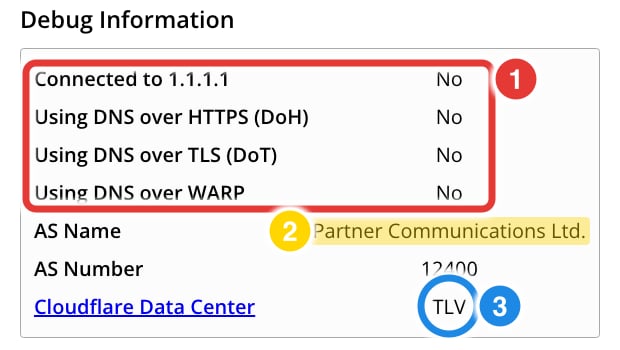
The red frame, number 1, is the point: four times No. The connection uses no encrypted DNS of any kind. Number 2, in yellow, is the network the test ran through, Partner in this case. In other words, every DNS question from this home goes out in the clear, over Partner's network. Number 3, in blue, is just the Cloudflare data centre that answered, in Tel Aviv. This is the default in most Israeli homes, not something specific to one provider.
So what happens to that information? This is where the law comes in. Israel's Communications Data Law of 2007, nicknamed the "Big Brother law", lets the police obtain traffic and location data from telecom companies, not content, with a court order, and in urgent cases with the approval of an authorised officer. I'm not saying anyone is watching you. I'm saying the data exists, and it sits with a company you didn't choose for its privacy policy.
What a VPN moves, and where to
When you're connected to a VPN, your phone or laptop opens an encrypted tunnel to the VPN provider's server, and all traffic goes through it, including DNS questions in the well-known apps. Your Israeli provider now sees one thing: that you're connected to a VPN server and data is flowing. The site names disappear from its view.
They don't disappear from the world, though. The visibility moves to the VPN provider. Sounds great, until you realise it's exactly the same information, held by a different company. So the real question isn't "VPN or not", but who you'd rather have holding your list of sites: a local telecom company subject to the Communications Data Law, or a VPN company that has promised not to keep logs and let an outside firm check.
Here I recommend NordVPN, for one reason you can verify: Deloitte has audited its no-logs policy six times, most recently in late 2025. An audit is a snapshot, not a contract, but six snapshots show a pattern. Surfshark, ExpressVPN and Proton VPN also have independent audits, so any of them beats a free VPN app nobody has checked. For shekel prices, including the conversion fee credit card companies charge on dollar payments, see our article on renewal prices.
Two more things a VPN doesn't do, so there are no illusions. If you're logged into Google or Facebook, they know it's you, VPN or not. And if the connection drops for a second, traffic can leak outside the tunnel. That's why the first setting I'd switch on in the app is the kill switch, which blocks browsing until the VPN is back.
No VPN at all: two free tools
If you just want to reduce what your provider sees, start with encrypted DNS (DNS over HTTPS). In Chrome it's under "Privacy and security", "Security", "Use secure DNS"; in Firefox under "Privacy & Security". Once it's on, go back to Cloudflare's page and watch a No turn into a Yes. It hides your DNS questions. It doesn't hide the site name at the start of the connection, or the server addresses.
The second tool, ECH (Encrypted Client Hello), encrypts that visible name too. According to Cloudflare's documentation, when it's active the network only sees a shared Cloudflare name, not the site itself. The catch is that it only works when both the browser and the site support it, and that isn't up to you.
So who does this really matter for? At home, a VPN is an extra layer for people who don't want their list of sites sitting with their provider. On café or hotel Wi-Fi, the "provider" is whoever runs the network, and you don't know who that is. There, in my view, a VPN stops being a luxury. We covered it in our public Wi-Fi guide.
Sources
Mozilla's explainer on encrypted DNS and SNI: hacks.mozilla.org/2018/05/a-cartoon-intro-to-dns-over-https
Cloudflare's documentation on DNS over HTTPS and ECH: developers.cloudflare.com/1.1.1.1/encryption/dns-over-https developers.cloudflare.com/ssl/edge-certificates/ech
Cloudflare's test page: one.one.one.one/help
Criminal Procedure (Enforcement Powers – Communications Data) Law, 2007 (Hebrew): he.wikisource.org/wiki/חוק_סדר_הדין_הפלילי_(סמכויות_אכיפה_–_נתוני_תקשורת
Deloitte's assessment of NordVPN: nordvpn.com/blog/nordvpn-no-logs-assurance-engagement-2025