
Friday, Black Friday. You've bought a new Samsung TV, and the same evening a two-year VPN subscription, because the price was good. You open the TV's app store and search for NordVPN, Surfshark or ExpressVPN. No results. It's not a bug. None of the three has an app for Samsung's system (Tizen) or LG's (webOS).
So before you buy, it's worth knowing what each provider has for the living-room screen. The information comes from the official setup pages and help articles of all three companies, checked on 24 November 2026.
The easy part: Android TV, Fire TV and Apple TV
Not much to compare here. All three have apps for Android TV and Google TV (including Chromecast with Google TV and TVs from Sony, TCL, Philips and Hisense), for Amazon's Fire TV and for Apple TV. Install from the store, log in, pick a server. Surfshark states plainly that you need an Apple TV on tvOS 17 or later, so if yours is very old, check the settings first.
One small difference: on the newest Fire TV models, which moved from an Android-based system to Vega OS, only ExpressVPN says on its page that its app is supported. NordVPN and Surfshark talk about Fire TV in general. If you're buying a new Fire TV Stick now, glance at your provider's support page first.
And if your TV is a Samsung or an LG? A streaming device plugged into an HDMI port, such as a Fire TV Stick or an Apple TV, solves most of the problem, because the apps do exist there.
Samsung and LG: three different answers
NordVPN: SmartDNS, and it tells you itself what it doesn't do
NordVPN has apps for Android TV and tvOS, and for TVs without an app it offers SmartDNS: you change the DNS address in the TV's network settings, and streaming services get their answers through NordVPN's servers. The page that explains SmartDNS versus SmartPlay (the same technology, but inside a full VPN connection) has a refreshingly honest table.
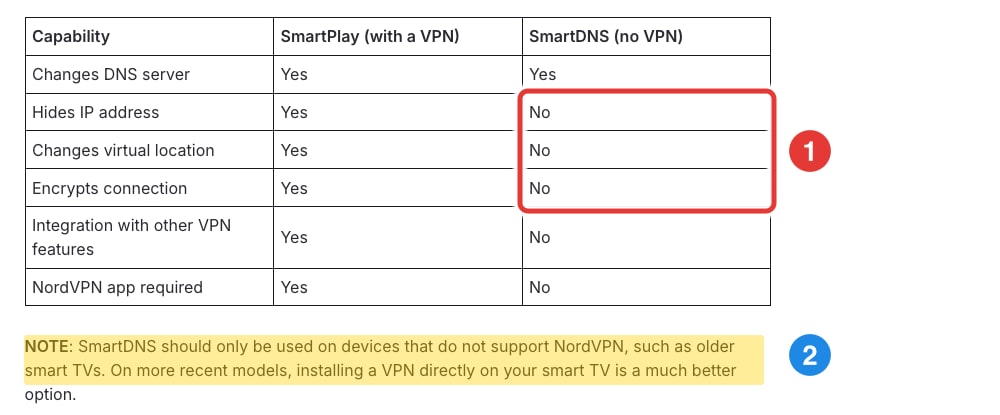
In the red box ①: without a VPN, SmartDNS doesn't hide your IP address, doesn't change your virtual location and doesn't encrypt the connection. Three times "No". Number 2, in yellow: NordVPN writes that SmartDNS should only be used on devices that don't support the app, such as older smart TVs, and that on newer models installing a VPN directly is better. I like a provider that puts its own product's limits in a table rather than a footnote. In practice: SmartDNS is convenient for a TV, but it isn't privacy protection. If that's what you want on the TV, you need a real VPN, meaning an app or a router.
ExpressVPN: two routes, and one doesn't encrypt
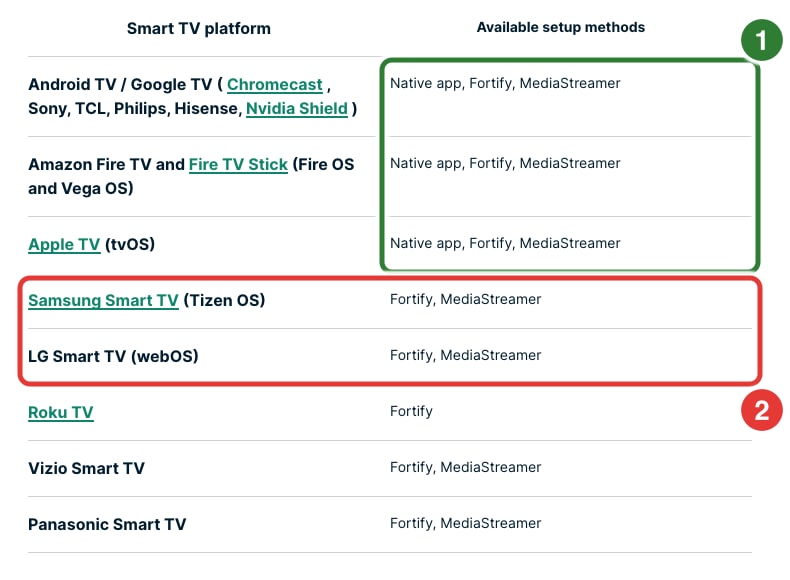
ExpressVPN's table is the clearest of the three. In the green box ①, Android TV, Fire TV and Apple TV get a "Native app". In the red box ②, Samsung and LG get two options: Fortify, which runs ExpressVPN on the router and covers every device in the house, and MediaStreamer, its DNS service. Here too the company hides nothing: the same page says MediaStreamer "doesn't mask your IP address or encrypt your connection". Same idea as NordVPN's SmartDNS, different name.
Surfshark: SmartDNS shut down in February
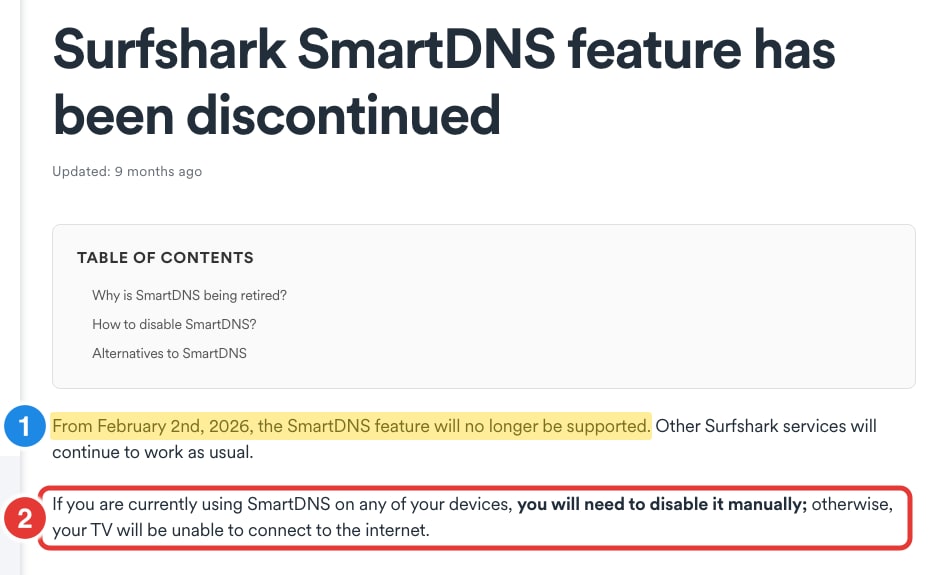
Surfshark used to have its own SmartDNS. In yellow ①: since 2 February 2026 it's no longer supported. Surfshark's reason: "demand for this feature was very limited". In the red box ② there's a line for anyone who set it up before: you have to remove it manually in the TV's network settings, "otherwise, your TV will be unable to connect to the internet". If there's a Samsung at home that someone configured a year ago and it suddenly has no network, look there first.
What does Surfshark offer instead? Three routes: a router running the VPN, a hotspot from a Windows PC connected to the VPN, or the app on TVs that support it. To my mind, for Samsung and LG, that's currently the least convenient offer of the three. On the other hand, Surfshark has an advantage the other two can't match: no limit on the number of devices.
The router: the fix nobody is excited about
A router is the only route that works with all three and gives full encryption to Samsung and LG too. ExpressVPN points out a real advantage on its page: a router connected to the VPN counts as one connection on your subscription, even with ten devices behind it. With NordVPN's limit of 10 simultaneous devices, that can matter.
The downside is that your Israeli ISP's router usually can't do this, so you need a router that runs a VPN. And there's another catch: when the whole house goes through a server abroad, your bank, Bit and government sites see a foreign address too, and some will block it. We covered that in our guide to banking apps and Bit abroad. For most homes it's more hassle than it's worth.
Why a VPN on the TV at all
Fair question. At home in Israel, most people don't need a VPN on the TV. What is true: your ISP sees which services the TV connects to, and if that bothers you, you can encrypt it (what your ISP sees). The second use, the more common one, is abroad: a Fire TV Stick in the suitcase, a rented flat with a TV, and the wish to watch the Israeli channels you already pay for.
This needs saying plainly: streaming services set their content by country, and using a VPN or DNS service to get around that may breach their terms of use. NordVPN itself writes on the same page that you should never use SmartPlay or SmartDNS to break the law or circumvent copyright. And there's no guarantee it works, because services detect many VPN providers' addresses.
So what would I buy
If your TV runs Android TV, Google TV or tvOS, all three will work, and the decision is about price and servers. If you want one recommendation from me, it's NordVPN. Like ExpressVPN, it also covers TVs without an app, with SmartDNS, which Surfshark no longer offers. It has 14 servers in Israel according to its official site, against Surfshark's 8, and that matters precisely in the Fire-TV-abroad case. And Deloitte has now audited its no-logs policy six times. The minus, said gently: 10 simultaneous devices, and a higher renewal price than the other two. We worked out exactly how much in our renewal price article: at Black Friday prices checked on 26 November 2026, Basic for 27 months costs about ₪269 ($80.73, at the Bank of Israel representative rate of 26 November, ₪3.334 to the dollar), and an Israeli credit card will usually add a foreign-currency fee of about 3%.
A family with lots of screens, tablets and laptops, and no Samsung or LG in the living room? Surfshark, for its unlimited devices. If you want a tidy router setup and prefer paying in shekels, ExpressVPN with Fortify. For everyone else, NordVPN. We also have head-to-heads: NordVPN vs Surfshark and ExpressVPN vs NordVPN.
Sources
NordVPN's Android TV and Apple TV setup pages and its SmartPlay and SmartDNS explainer, ExpressVPN's smart TV page, Surfshark's smart TV page and its help notice on the end of SmartDNS, all as loaded on 24 November 2026.